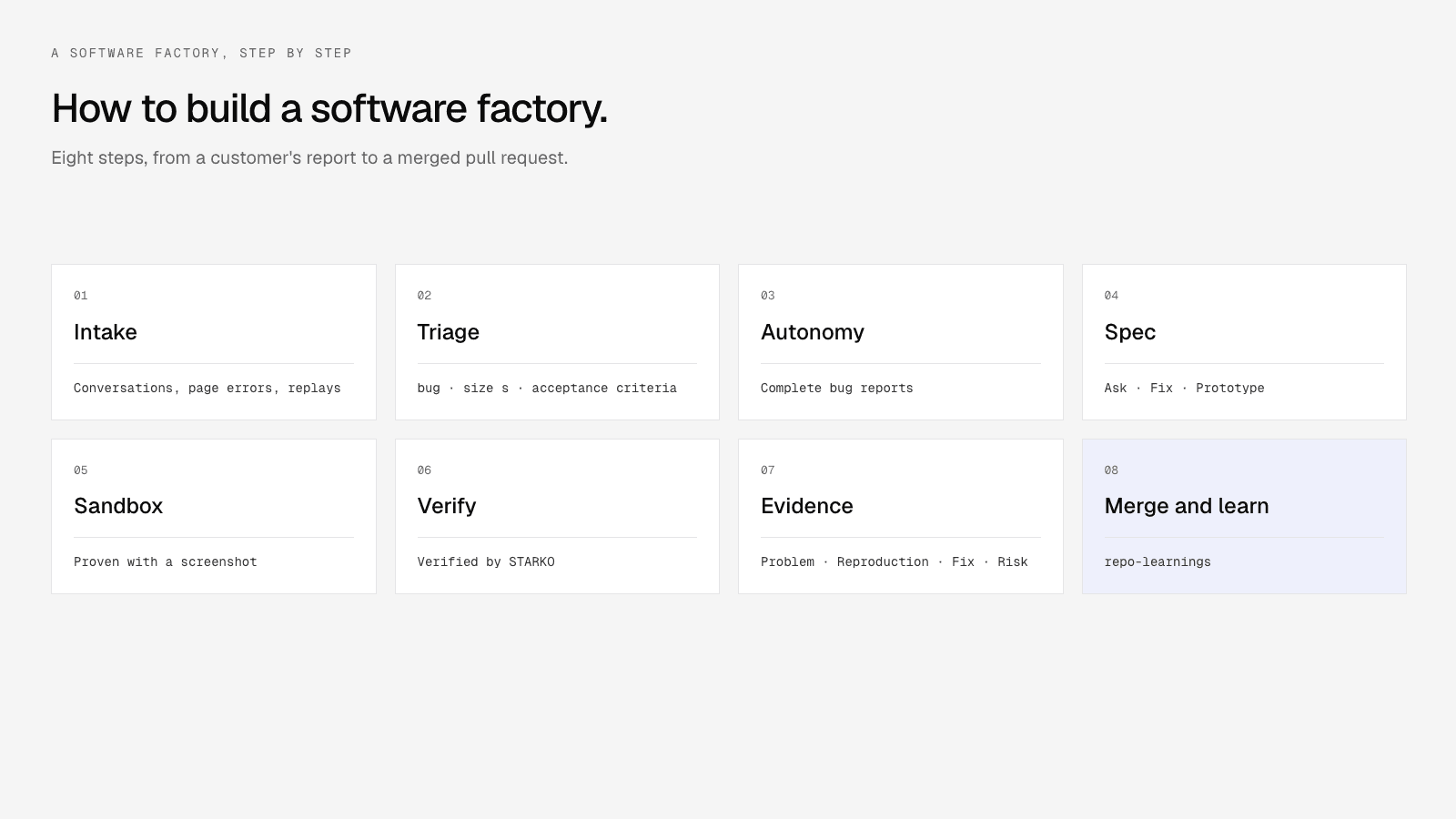
How to Build a Software Factory: 8 Steps From Customer Feedback to a Merged Pull Request
Most teams that try to build a software factory start with the agent. They pick a coding agent, wire it to a ticket tracker, and wait for pull requests. Two weeks later the agent is busy, review is slower than before, and nobody can say which of the merged changes a customer actually asked for.
The agent is the easy part. A software factory is the loop around it: what work goes in, where the agent runs, how its output is checked, and who decides what ships. Get those right and almost any capable agent will do.
This guide walks through that loop in eight steps. Each step is written to apply to whatever tools you use, followed by how the same step looks in Starko, so you can see one concrete version of it. We build Starko, so read those parts with that in mind.
Key Takeaways
- A software factory is a loop: intake, triage, spec, sandbox, build, verify, review, merge, learn. The agent is one stage.
- More than 40% of GitHub pull requests now start as an agent's draft (), so review is the bottleneck to design for.
- Start with a human at every merge, and measure merge rate before you automate more.
What do you need before you build a software factory?
Building a software factory needs four things before the first run: a repository the agent can access with narrow permissions, a sandbox that can install and start your app, a source of work that reflects what users need, and a test command that tells you whether a change works. Without the last one, you are generating pull requests, not verified changes.
A test suite does not have to be large. It has to be runnable in a clean environment with one command, and it has to fail when something is broken. If your tests only pass on one engineer's laptop, fix that first. Every later step leans on it.
You also need an owner. Somebody decides which projects the factory may touch, which kinds of work it may pick up on its own, and what happens when a run goes wrong. In a team of eight, that's usually the tech lead. In a team of eighty, it's a platform group. Either way, name the person before you install anything.
Step 1: Decide what goes into the factory
This step decides whether the factory is useful, and it's the one most guides skip. Agents will happily implement whatever lands in the queue. If the queue is a backlog of stale tickets, the factory ships stale work faster.
The best input is evidence from users: support conversations, bug reports, page errors, and the places in your product where people get stuck. That evidence tells you what to build and gives the agent the context to build it. A ticket that says "export is broken" is weak. A ticket with the customer's message, the browser, the console error and a replay of the click is something an agent can reproduce.
In Starko, work comes in from several places. Support conversations from the chat widget, email, WhatsApp, Instagram and Slack become tickets. JavaScript errors the widget sees on your pages become bug tickets, "grouped, deduplicated, and never sent to the fix agent until a person accepts them." Session replay findings are merged onto one ticket as sightings, so ten visitors confused by the same screen show up as one request with "10 visitors" on it. GitHub issues can sync in as tickets too.
Step 2: Triage before anything is built
Raw input is noisy. The same bug arrives five times in five phrasings. A question looks like a feature request. A feature request is really a docs gap. A factory without triage burns runs on duplicates and on work that should never have been code.
Good triage does three jobs. It classifies the work, it sizes it, and it writes down what "done" means. That last part matters most: acceptance criteria written before the run are the yardstick the reviewer and the human use later.
In Starko, triage runs on every ticket in a project linked to a repository. It labels the ticket as a bug, feature request, improvement, docs gap, question or other, sizes it from extra small to large, writes acceptance criteria, and leaves an internal note tagging the owner when the report is incomplete. Nothing about triage starts a run on its own. That's the next decision.
Step 3: Choose how much autonomy each project gets
Here's where teams get burned. "Let the agent pick up everything" sounds efficient until it opens twelve pull requests on a Monday morning and your two reviewers lose the day.
Autonomy should be a per-project setting, and it should start low. A good ladder looks like this:
In Starko, this is the auto-dispatch policy on each project, with four options: "Off (only @starko mentions)", "Complete bug reports", "Bugs and docs gaps", and "Bugs, docs and small changes (xs/s)". Each project also has a monthly budget of automated runs. When it's used up, the ticket gets a comment saying so, and a person can still start a run by hand.
Step 4: Write the spec, or decide who does
Somebody has to turn "customers can't export in Safari" into a change. In most factories, the agent writes its own plan. That's fine for a bug with a clear reproduction. It's a gamble for a feature with three reasonable designs.
So split the work by risk. For bugs, let the agent plan, but require it to reproduce the problem before it touches code. For features, put a checkpoint in front of the build: a prototype, a short plan, or a question back to the person who asked.
In Starko, there are three ways to hand a ticket to the agent, picked when you mention @starko in an internal comment:
- Ask: "Starko answers in the thread; it never starts a run."
- Fix: "Your comment is the brief; the run starts right away."
- Prototype: "Starko publishes mockup pages here and writes no code." You pick a direction, then it builds.
For features, the agent writes three to six acceptance criteria in its notes before building. If the ticket is missing something it can't infer, it stops once and asks the ticket's assignee, and a plain reply resumes the run. While it runs, you can steer it: a message in the run "is picked up at the agent's next step, never mid-command."
Step 5: Give the agent a sandbox that runs your real app
An agent that can only read code guesses. An agent that can install dependencies, start your database, open the app in a browser and click the broken button can check its own work. That difference shows up directly in your merge rate.
The sandbox should be fresh for every run, isolated from production, and disposable. It should hold secrets the app needs to start, without placing those secrets in the agent's prompt. And its access to your repository should be the narrowest that still works: write access to code and pull requests, not to your CI configuration.
In Starko, the setup screen says it plainly: "Let Starko set up its sandbox. It reads the repo, asks you only for secrets it can't derive, installs, starts the app and proves it with a screenshot. About four minutes." The steps are install, start the backend with Docker Compose, start the app, take the screenshot, run the tests, and save the environment. Secrets are "stored encrypted, never shown again and never placed in a prompt." Each run gets a token for one repository that can write code and pull requests but deliberately can't touch GitHub workflows, so an agent can't rewrite your CI. You can also add agent instructions per project: your stack, conventions, how to run tests, and areas to avoid.
We wrote up the sandbox setup in more detail in .
Step 6: Verify the work, and don't trust the agent's word for it
An agent saying "tests pass" is a claim. The factory should check it. That means running the test command again after the agent finishes, in the same sandbox, and recording the real exit codes. For anything a user sees, it means a before and after screenshot.
Then have a second reviewer look before a human does. That can be a reviewer agent with a different prompt, your CI, or both. The point is to catch the obvious problems before they cost a person's attention.
This matters because review is where AI coding gets expensive. Teams with high AI adoption merged 98% more pull requests, but their review time rose 91% and average pull request size grew 154% (). Faros sells engineering analytics, so treat it as vendor research. And 48% of developers say they trust AI when they can easily validate its answers (). Make the work easy to validate.
In Starko, after the agent finishes, Starko re-runs the project's commands in the sandbox and marks the pull request "Verified by STARKO" with each command's exit code. A reviewer agent gives a verdict of approve or revise. Small diffs that touch no sensitive paths skip the model review and say so. If the reviewer or CI asks for changes, the agent gets a revise round, capped per pull request, so a stubborn failure can't loop forever.
Step 7: Make the pull request carry its own evidence
Picture the reviewer's side. It's 4 p.m., there are six agent pull requests waiting, and each one says "Fixed the issue." The reviewer has to open the ticket, reread the customer's message, check out the branch and reproduce the bug to trust any of them.
Now picture a pull request that opens with the problem in one sentence, says whether the bug was reproduced, shows the fix, lists the commands that ran with their exit codes, has a screenshot before and after, and names what a human still has to check. The reviewer can decide in five minutes.
In Starko, every pull request follows the same shape: Problem, Reproduction, Fix, Verification, Risk and Out of scope. Below that sits an evidence block with "Before this ships, a human must:", any concerns the agent flagged, any deviations from the ticket, a before and after screenshot table, and the full list of commands run in the sandbox. It opens as a draft and links back to the ticket, so the customer's original report is one click away.
Step 8: Decide who merges, then learn from every run
The merge is the control that makes the rest safe to automate. Keep a person on it until your data says otherwise. A good rule: turn on automatic merging only for a class of change that has merged without edits many times in a row, and only with branch protection on.
Then close the loop. Every closed or reverted pull request is a lesson about your codebase, and the factory should keep it. Conventions the agent discovered in one run should be there at the start of the next.
In Starko, you merge from the pull request panel on the ticket, or tell Starko "merge it" in chat or Slack. Merging needs the Integrations permission, so only admins and owners can do it. During setup, Starko asks whether "reviewed, green and conflict-free pull requests" should merge on their own, with branch protection still applying. If you're new to agents, leave that off for the first few weeks. After each run, the agent can record up to five learnings about the repository, and later runs read them. Pull requests that close unmerged or get reverted are tracked as outcomes, so you can see where the factory struggles.
Why do most AI software factories stall?
The mistakes we see most are about the loop around the agent, not the agent itself:
- Feeding it the backlog. Old tickets have lost their context. Start with fresh customer reports that can be reproduced.
- No working test command. If the sandbox can't run your tests, verification is theatre.
- Autonomy on day one. Auto-dispatch everything and reviewers drown. Climb the ladder in step 3.
- Trusting the summary. Re-run the checks after the agent finishes. Read exit codes, not prose.
- Counting pull requests. Opened pull requests is a vanity metric. Track merge rate, time to merge and cost per merged pull request.
How do you know your software factory is working?
A software factory is working when its merge rate stays high while the work it handles grows. Three numbers tell you: the share of runs that end in a merged pull request, the median time from report to merge, and the total cost divided by merged pull requests. Pull requests opened is not one of them.
Look at them weekly for the first month. A merge rate under half usually means bad input or a weak sandbox, not a weak agent. A long time to merge usually means pull requests that are hard to review. Rising cost per merged change means runs are failing late.
For context, 90% of agent-started pull requests on GitHub merged within two weeks by September 2026, against about 86% for pull requests without detected agent involvement (). That's an average across everyone. A factory fed with reproducible customer bugs should do better on its own codebase. Starko's dashboard shows merge rate and cost per merged pull request next to every run, for exactly this reason.
Frequently Asked Questions
What is an agentic software factory?
An agentic software factory is a system in which AI coding agents take work from a queue, build it in isolated sandboxes, verify it and open pull requests, while people decide what goes in and what merges. The "agentic" part is the agents doing the implementation. The "factory" part is the repeatable loop around them.
How long does it take to build a software factory?
A basic software factory takes a few days to set up with an off-the-shelf platform: connect the repository, get the sandbox to start your app, and run a handful of supervised tasks. Building one from scratch with your own orchestration, sandboxes and review agents usually takes a platform team several weeks. Tuning it to a high merge rate takes longer than either.
Do I need my own infrastructure to run a software factory?
No. Most software factory platforms run agents in sandboxes they host, and some also let you run on your own cloud. You need your own infrastructure only if your security rules keep code and secrets inside your network. Check where the sandbox runs and what token it holds before you connect a repository.
Should a software factory merge pull requests automatically?
A software factory should start with a person approving every merge and automate merging only for change types with a long record of merging unedited. Branch protection should stay on either way. Automatic merging is a reward for a proven record, not a starting setting.
What should a software factory work on first?
A new software factory should start on small, reproducible bugs reported by real users, because they have clear acceptance criteria and are easy to verify. Avoid large refactors and new features until the merge rate on bugs is high. Documentation gaps are a good second category.
Which coding agent is best for a software factory?
The best coding agent for a software factory is one that can run your app in a sandbox, reproduce problems and attach verifiable evidence to its pull requests. Raw benchmark scores matter less than those three things. We compared the main options in and .
Where to go from here
If you're still deciding whether you need one, start with . If you want to see steps 1 to 8 running on your own repository, lets you connect GitHub and watch the first run.