Starko AI Sets Up Its Own Sandbox: Node 24, Docker, Secrets
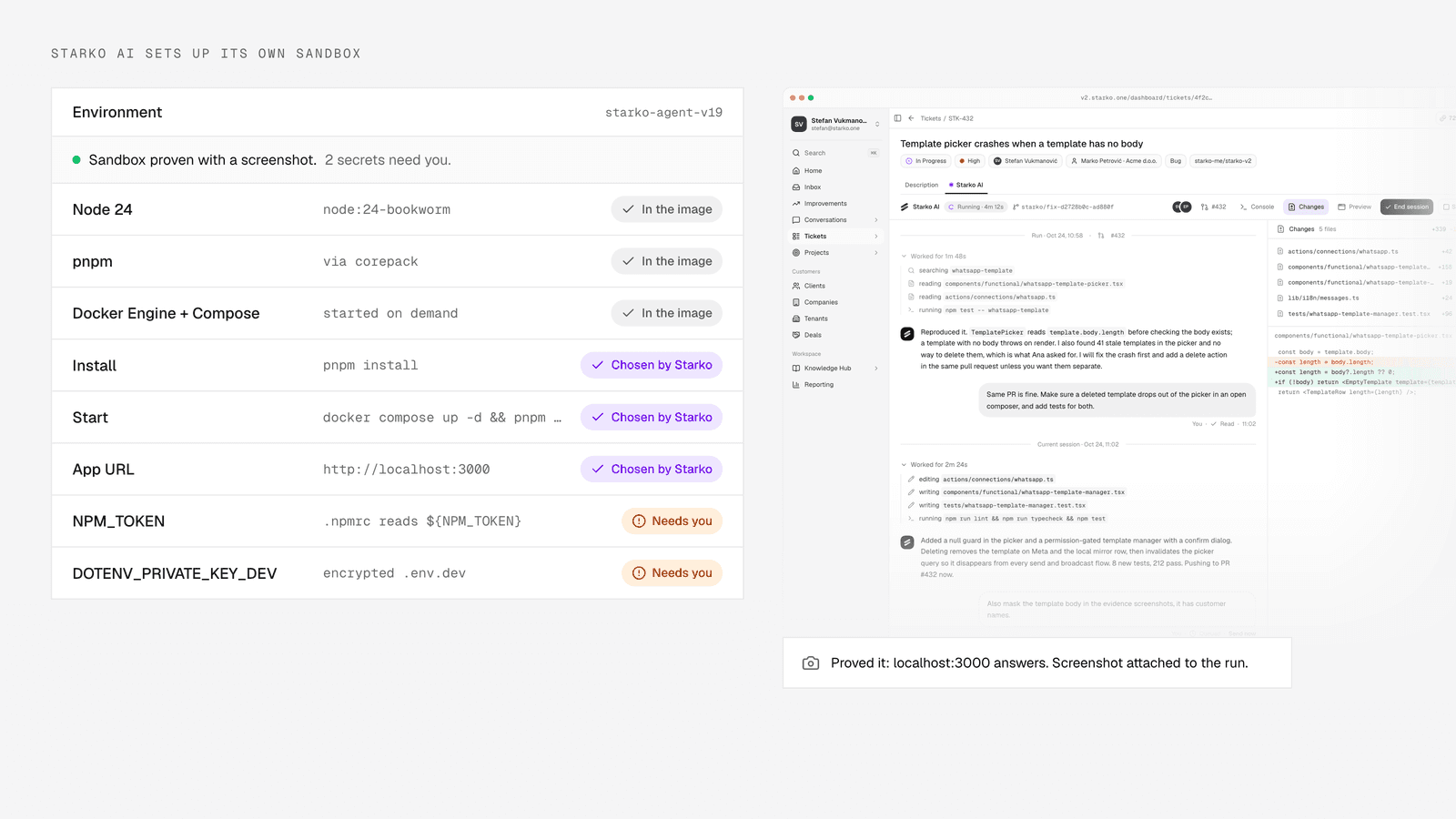
Starko AI now sets up its own sandbox. When a project is set up, it reads the repository's manifests, names the secrets only a person can give, then runs a setup session that installs dependencies, brings services up, starts the app, takes a screenshot to prove it, and records the commands it used as the project's own. The image underneath now ships Node 24, pnpm, yarn and Docker Engine with Compose. This shipped on 31 October 2026.
Here is why we built it, what changed, and what we have not yet proven.
Why a customer's repository would not run inside the sandbox
A customer's repository could not run its real app inside the agent's machine, and the reasons were ordinary. The project used an encrypted env file, private GitHub packages, pnpm, Node 24 and a Docker Compose backend. The agent could read the code but could not start the app.
Three of those five blockers already had a project setting that would have solved them. Nobody had filled it in. The settings sat in an eleven-section sheet, and an eleven-section sheet is where settings go to be ignored. The other two, Docker and Node 24, were gaps in the sandbox image itself.
Cursor's cloud agents, Devin and Jules all let the agent set up its own machine and prove it works. We wanted the same thing inside the .
What the new sandbox image ships
The sandbox image, snapshot v18 in our build, is based on Node 24 on Debian bookworm and ships pnpm and yarn through corepack, plus Docker Engine 29 with Compose and Buildx. A project that needs a Compose stack beside the app can bring it up inside the sandbox.
Our sandboxes run as root under sysbox, so the Docker daemon needs no extra privilege. A small helper starts it on demand, is safe to call twice, and cleans up a stale pid file. The launcher starts it at every runner start, and the warm scrub stops it before a snapshot is taken.
We verified the image live. Hello-world ran, and an nginx plus postgres Compose stack answered on localhost from inside the sandbox. A later revision, v19, carries a lock fix from code review and supersedes it. Warm project snapshots rebuild themselves when the base image moves, so nothing had to be redone per project.
How Starko AI sets up its own sandbox
Setup happens in two steps: a scan that needs no sandbox, then a session inside one.
The scan reads the repository's manifests over the GitHub contents API. From .npmrc it picks out ${VAR} references, which point at private registry tokens. From dotenvx configuration it finds the private key that decrypts an encrypted env file. From env example files it lists the expected keys. From Compose files it lists the services. It also suggests install, start, URL and test commands from what it sees. The result: the secrets only a human can supply, named exactly, before any sandbox starts.
Then an environment-setup session runs in a fresh sandbox. It installs dependencies, brings the Compose services up, starts the app, and proves it with a screenshot of the running page. It writes what it learned to .starko/env-setup.json. The commands it chose become the project's install, start and test commands, and the warm snapshot is rebuilt with everything installed, so the next fix run starts from that state.
The session has its own budget, a default of 300k billable tokens.
What happens when setup is blocked on a secret
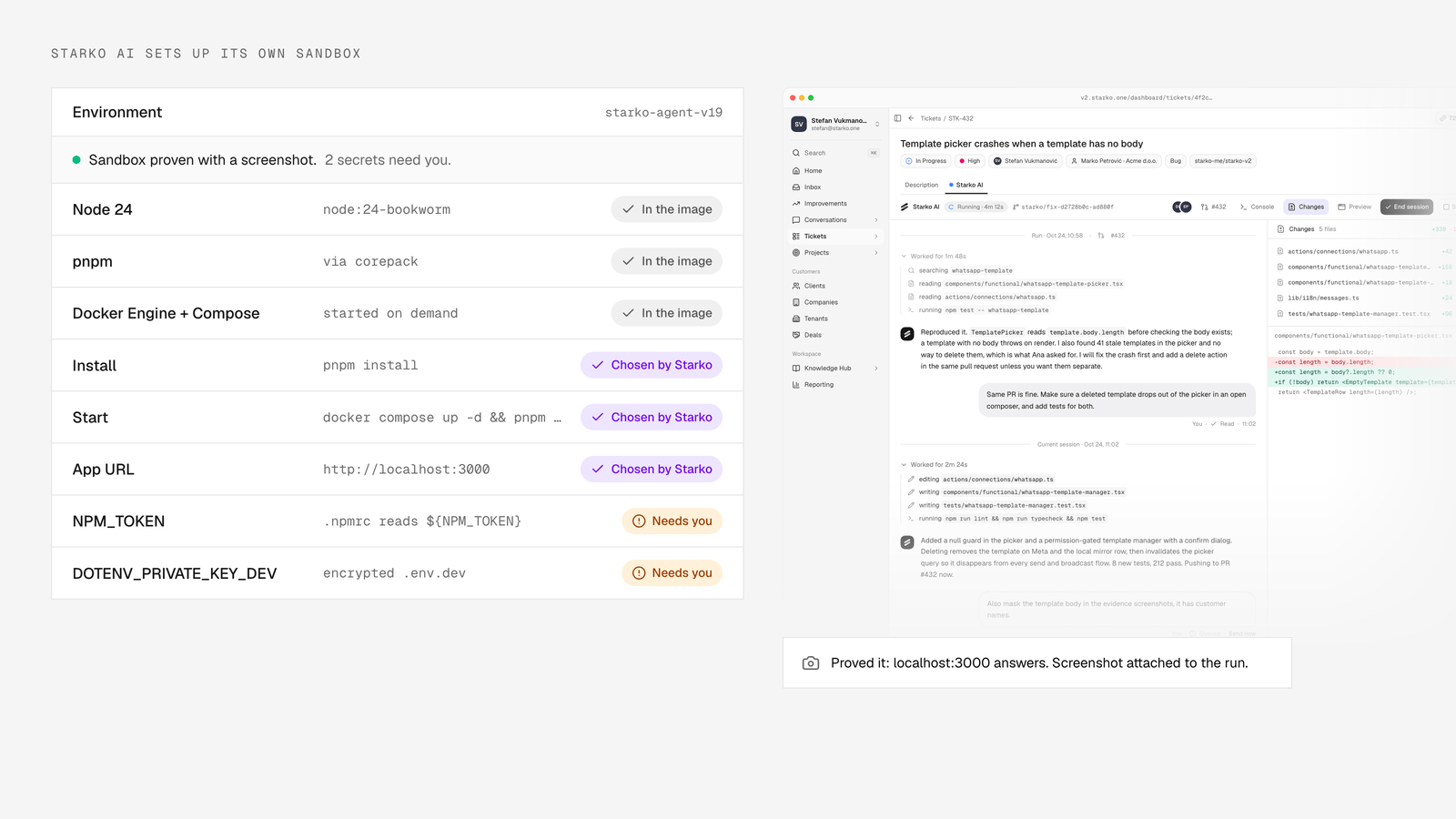
A blocked setup ends as "needs input" and names the exact variables it is missing. It does not fail with a generic error. If the app needs a private registry token and a dotenvx key, the run says so, by name, and waits.
That is the same contract a fix run uses when it needs something only you know, described in the . You provide the value, and it goes into the project's environment and never into the brief.
Where the settings live now: Agent and Environment tabs
The Starko AI sheet on a project now has two tabs, Agent and Environment. Agent keeps the settings about the coding agent. Environment shows a status line and one row per item the scan found, with the existing field behind an Edit control. When nothing is configured yet, Environment shows a single "Set up the sandbox" card.
That card opens a two-screen flow: first the secrets and any login the app needs, then the live setup run. The same flow is reachable from the onboarding "running" screen for new projects.
Which agent runs inside that sandbox is a per-project choice. The options are covered in .
Environment variables reach sandboxes that are already running
Saving an environment variable pushes it into every live sandbox of the project, including sessions already mid-run. This shipped on 23 October 2026.
The launcher writes a project-env.json file into the sandbox. The runner re-reads that file before every bash call and restarts its shell when the file has changed. When you save variables in the sheet, the file is pushed into each running sandbox of the project. The agent's next command sees the new value.
Why a session never strands on an unanswered tool call
A session never strands because the runner now checks twice for unanswered tool calls before it exits, and the control plane restarts a runner that has died. Environment setup means long-running commands, and a runner that exits while a command is still open would leave the session stuck on "Working" for good. We fixed that on 13 October 2026 after one real incident.
In that incident the agent issued one bash call to push a branch and open a draft pull request. The in-sandbox runner lost the call. A watchdog restarted the worker after 150 seconds, the restarted attempt ended at once, and the runner exited with "session complete" while the session was still waiting on the result of that call. The commit stayed unpushed in the sandbox.
Three changes followed:
- The runner only exits after a status read and a full walk of the event history both find no unanswered tool call, and both pass twice, five seconds apart. An unreadable state never exits.
- If an attempt ends by itself with calls still open, the runner answers them with an explicit note that the command did not run and must be issued again. It never claims a command ran.
- The control plane watches for a session waiting on a tool call with no runner process in its sandbox, and starts the runner again there, at most once every three minutes. A live runner is never doubled.
The earlier and the removal of the serve the same goal: long sessions finish or report, they do not vanish.
What is proven and what is not
The image is proven. The setup flow is not yet proven end to end. The v18 snapshot was built and verified on a live sandbox, with Docker and a Compose stack working. v19 adds a lock fix from code review. The runner changes were pinned by a new supervision test, and the sandbox, agent and mockup suites passed, 101 tests at the time.
The setup flow itself, scan plus session plus the Environment tab, was covered by unit and render tests at merge time. It has not run end to end against a live sandbox with a real repository. The first real run will be on one of our own projects, and we will write up what happened, including what broke.
Nothing here changes billing: you pay per merged pull request, and the tiers are on the .
Frequently Asked Questions
What does the Starko AI sandbox include now?
The current image is based on Node 24, ships pnpm and yarn through corepack, and includes Docker Engine 29 with Compose and Buildx. The Docker daemon starts on demand, so a project's Compose backend can run next to the app the agent is fixing.
Which secrets does Starko ask me for?
Only the ones a scan of your repository shows it cannot derive: private registry tokens referenced as ${VAR} in .npmrc, the dotenvx private key for an encrypted env file, and keys listed in your env example files. Starko names them exactly, and values never appear in the brief the agent reads.
What happens if the setup session cannot start my app?
The run ends as "needs input" and lists the exact variable names it is missing. You add them in the Environment tab, and they are pushed into any live sandbox for the project. A setup session is capped at a default of 300k billable tokens, so it cannot run away.
Has the setup flow run on a real project yet?
Not yet. At merge time it was covered by unit and render tests, while the image itself was verified on a live sandbox. The first end-to-end run will be on one of our own projects, and we will publish the result either way.