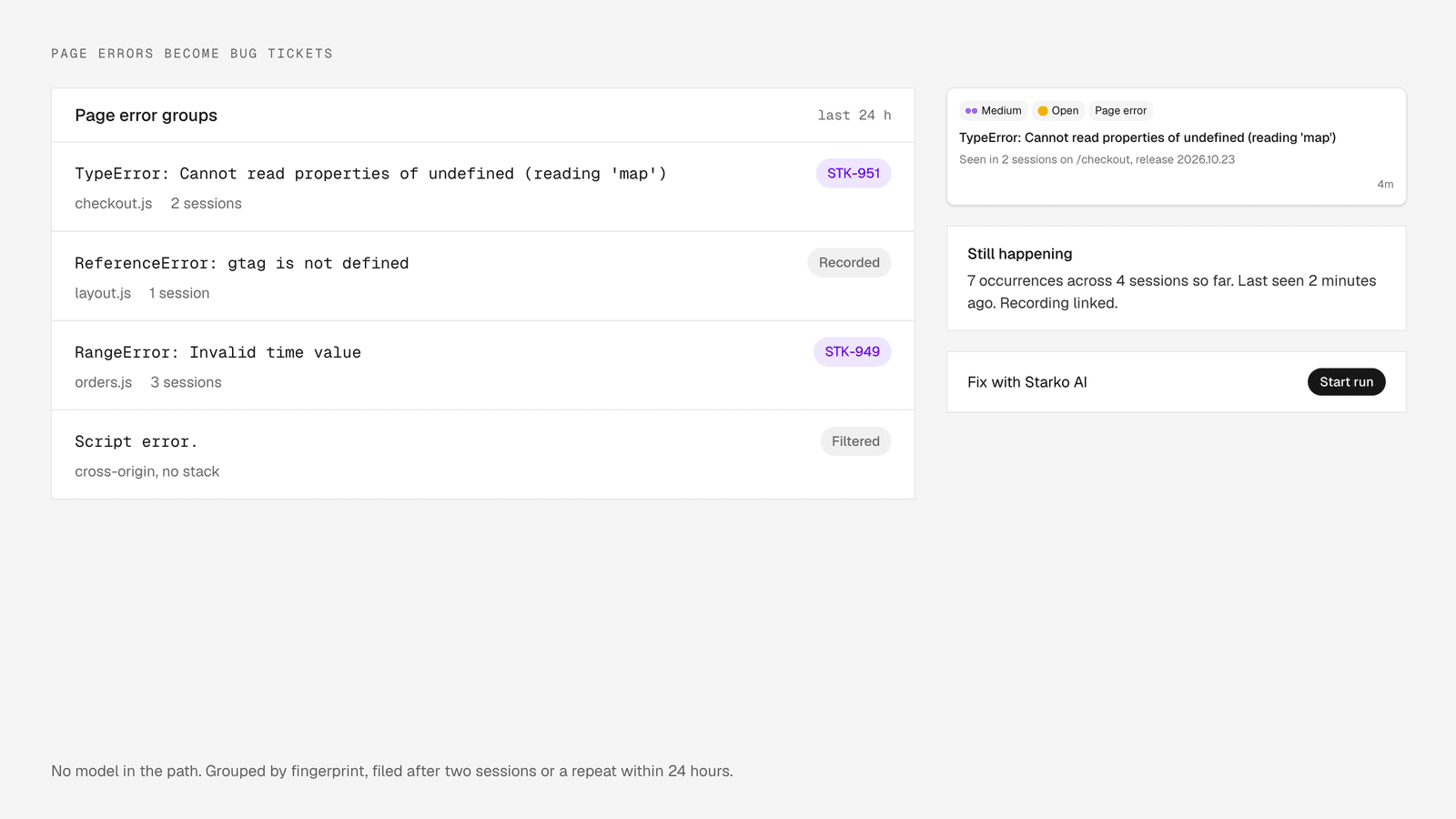
Page Errors Become Bug Tickets, With No Model in the Path
When a visitor hits a JavaScript error on a page where the Starko widget is installed, the widget reports it, Starko groups it under a deterministic fingerprint, and files one bug ticket per group once the error has been seen by two distinct sessions or repeats within 24 hours. No model is called anywhere on that path. The ticket then sits in the same loop as every other ticket: a person can press Fix with Starko AI and a run starts from it. This shipped on 23 October 2026, and it is off by default.
We built it because a JavaScript error on a customer's page is feedback nobody had to write in about. The turns support conversations into merged pull requests, and this closes the gap for the conversations that never happened.
Why there is no model in the path
Grouping and filing are deterministic because the team has to trust the counts, and nobody should pay for an agent run they did not ask for. A model could cluster errors and write a tidy title. It could also put the same error in two tickets on different days, and then the occurrence count on either one means nothing.
The second reason is cost. New tickets in a repository-linked project normally go through a classifier, and some workspaces let accepted bugs dispatch a run automatically. An error ticket is filed with its classification already set to bug and its classification time recorded, so the classifier never sees it and auto-dispatch never fires. The model enters the picture only when a person asks for it.
What the widget reports, and what it throws away
The widget reports JavaScript errors it sees on the page to a beacon endpoint, in batches of up to 10, and the session recorder hands over the same events when recording is on. Starko dedupes the two sources per session, fingerprint and minute, so a replay chunk and a beacon carrying the same error count once.
Not every error is worth a ticket. Before fingerprinting, the pipeline drops:
- cross-origin "Script error." reports that arrive without a stack;
- frames from browser extensions;
- the ResizeObserver loop warning;
- aborted requests, "Failed to fetch", NetworkError and other offline failures;
- frames from the Starko widget and recorder themselves;
- empty messages.
That list exists so a ticket means something broke in your code, not in a visitor's ad blocker or their train Wi-Fi. The is the only thing a customer has to install; error reporting rides on it.
How the fingerprint groups errors
The fingerprint is a hash of the normalised message, the source file and the top stack frame, with line and column numbers, chunk hashes, UUIDs, numbers and query strings stripped out first. Two reports with the same fingerprint are the same bug, whatever the visitor was doing at the time.
Stripping matters more than it looks. Bundlers put a content hash in every chunk name, so without normalisation each deploy would open a fresh group for the same unfixed error. Line numbers move whenever a file above the error changes. A UUID in the message would make every user their own group.
The page path is deliberately not part of the key. A missing null check in a shared component fails the same way on every page that renders it. That is one bug, and it should be one ticket, not a ticket per page that a person has to merge by hand.
The filing rule
One ticket per group, filed once the group has been seen by two distinct sessions or the same error repeats within 24 hours. The rule is a pure function, covered by tests, and it does the same thing every time it sees the same input.
The first-occurrence wait is there because a single report can be a visitor with a half-loaded page. Two sessions, or a repeat within a day, is enough signal to put it in front of the team.
The cap of 20 new tickets per workspace per day is a brake, not a filter. A broken deploy can produce many distinct fingerprints in an hour. The first 20 land as tickets and the rest are marked capped. An archived or retired ticket whose error returns gets a new ticket, because the regression deserves its own thread.
What the ticket carries
The ticket carries the error message, a trimmed stack, the page URL, the user agent, the client, the release, and a link to the session recording when one exists. It is tagged "Page error", classified as a bug sized Small, set to medium priority, and filed into the customer project.
The release comes from a new release prop on the widget. Pass your build identifier and the ticket says which version threw. The recording link is the part we care about most: when session replay is on, the ticket links to the recording of what the visitor was doing when the page broke, the same recordings described in .
That bundle is what an engineer would ask for first. For the coding agent, it is the brief.
How occurrences are counted without flooding the thread
An open error ticket keeps a single "Still happening" comment current rather than adding a comment every time the error fires. The comment reads along the lines of "Still happening, N occurrences across M sessions so far, last seen at such a time", and the pipeline updates it in place.
The first version, the one that shipped on 23 October, posted at most one sighting comment per hour on the open ticket. That was already a limit, but on a busy error it still filled the thread with hourly lines. A day later we changed it to one tally comment that stays current. A fresh comment is added only when a person has commented since, so the latest count is always below the latest human message.
Turning it on
The switch is in Settings, under Starko AI, labelled "Report page errors as tickets", and it is off by default. It needs the AI configuration capability to change. When it is off, the beacon endpoint answers with a 403 and an enabled: false body, and the widget stops reporting for that page.
The endpoint is rate limited at 60 requests per 10 minutes per client and 5,000 per hour per workspace, with a body limit of 256 KiB and at most 10 errors per batch. The widget learns whether reporting is on, where to send reports and the batch size from the workspace settings it loads on start, so the only thing to add on the page is the optional release prop. The installation docs cover both.
This landed alongside the single-view ticket page in the .
Where the error ticket goes next
From the moment it is filed, an error ticket is an ordinary ticket in the loop. It shows up in the project, it can be assigned, and the Development card on the ticket page offers Fix with Starko AI like any other bug.
When someone presses that button, the run follows the path in : the brief is written from the ticket, which already holds the stack, the URL, the release and the recording; the agent reproduces in a warm sandbox; verification runs the project's tests; the reviewer agent reads the diff; a person merges.
Billing does not change. Error reporting sits with feedback intake and session replay analysis, which are free. You pay only when a pull request merges, and the tiers are on the . A ticket filed by a page error costs nothing until a person decides it is worth a fix.
Frequently Asked Questions
Does Starko use a model to group or file page errors?
No. The fingerprint is a hash of the normalised message, source file and top stack frame, and the filing rule is a pure function with fixed thresholds: one ticket per group after two distinct sessions or a repeat within 24 hours, at most 20 new tickets per workspace per day. A model is only involved when a person starts a Starko AI run on the ticket.
Why is the page path not part of the fingerprint?
Because the same bug in a shared component fails the same way on every page that uses it. Keying on the path would split one bug into a ticket per page. The ticket still carries the URL where the error was seen, so you know where it happened without the grouping depending on it.
What happens when a workspace hits the daily cap?
After 20 new error tickets in a day, further groups are marked capped and no ticket is filed for them. Occurrences are still recorded on the group, and existing open tickets keep their counts updated. The cap is there so a bad deploy produces a manageable list, not a flood.
Will a page error ticket start a Starko AI run on its own?
No. The ticket is inserted with its classification preset to bug, so the classifier and auto-dispatch never run on it. A run starts only when a person presses Fix with Starko AI or mentions Starko AI on the ticket, and you pay only if the resulting pull request merges.